Lovelystory Font: A Playful Script for Campaign Creativity
Choosing Lovelystory for a Seasonal Instagram Campaign
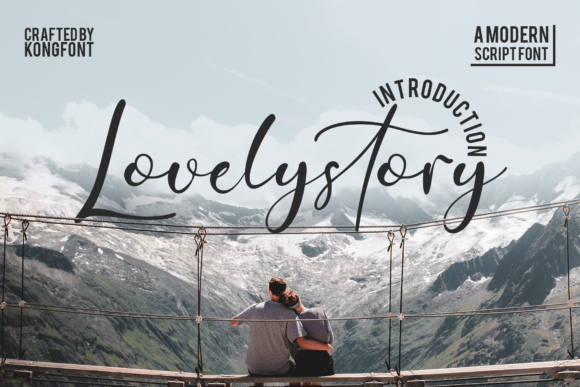
I recently started designing a summer collection teaser for a small lifestyle brand. The campaign visuals needed to feel fresh, approachable, and a little whimsical. I was flipping through my font library, looking for something that could anchor the Instagram carousel posts and Reels covers without feeling too formal or overused. That’s when I landed on Lovelystory—a modern script font from Kong Font Studio. It had just the right balance of personality and legibility for the campaign’s tone.
Visual Style and Brand Personality Match
Lovelystory is a clean, bouncy script with a handmade feel that doesn’t sacrifice readability. It has the energy of a handwritten note but the polish of a premium font. The slight bounce in the baseline gives it movement, and the soft curves make it feel friendly and modern. It’s not overly cursive or dramatic like some script fonts, which makes it more versatile for digital use. For a brand that leans into minimalism with a playful edge, this typeface fits like a glove.
Testing Lovelystory in Real Campaign Assets
I used Lovelystory for the main headlines in a set of Instagram post templates. The primary message was “Summer is Coming” in a light coral pink over a clean white background. On desktop, the font looked smooth and elegant. But more importantly, on mobile previews, it held up well as a large overlay on a lifestyle image. I also tested it at smaller sizes for subheadings and found that it started to lose clarity below 18px, especially on dark backgrounds.
For the Reels cover, I paired it with a bold sans serif for contrast. The combination gave the content a modern editorial feel that stood out in the feed without looking cluttered. I also used it for a Pinterest campaign pin, where the font’s clean strokes and open spacing helped the text remain readable even when the image was cropped in the platform’s grid view.
Where Lovelystory Shines (and Where It Doesn’t)
This font works best as a display font—ideal for headlines, callouts, logo-style text, and short-form social media captions. It’s not suited for long paragraphs or small body text. In a recent email promotion, I tried using it for a featured quote in the header, and it worked beautifully. But when I tested it for bullet points in the body copy, it became hard to read, especially on mobile clients with limited rendering.
Lovelystory also doesn’t translate well to formal or corporate settings. It feels too playful for B2B campaigns or legal disclaimers. I wouldn’t recommend it for YouTube end screens with dense information or digital ads that need to communicate urgency or authority. However, for a product launch with a fun, feminine, or lifestyle-oriented brand, it’s a strong contender.
Font Pairing and Design Balance
One of the keys to using a script like Lovelystory effectively is pairing it with a more neutral typeface. I typically go for a clean sans serif like Montserrat or Lato for supporting text. This creates a visual hierarchy that guides the eye naturally from headline to subhead to call-to-action. Occasionally, I’ll mix it with a soft serif for a more editorial layout, especially for quote graphics or Pinterest pins where a bit more elegance is desired.
The font also benefits from thoughtful spacing. When used in a layered design—like a YouTube thumbnail with a background image—giving it breathing room ensures it doesn’t get lost. I also found that using a light stroke or shadow helped it pop against busy visuals without needing a drop shadow that could feel heavy.
Technical Considerations Before Use
Before deploying Lovelystory in client work or branded templates, I made sure to check the file details. It comes in a standard format with multilingual support, which is essential for campaigns that may expand beyond English. I also tested the alternates and ligatures, which add subtle character variations and help avoid repetition in repeated use across a content series.
It’s a freebie, which is great for indie creators or small businesses on a budget. But I always double-check the licensing terms—especially when using fonts in commercial work, merchandise, or client deliverables. Fortunately, Lovelystory includes commercial use permissions, which makes it easy to integrate into a variety of digital assets without legal concerns.