Marly Rosemary: A Delicate Script Font for Elegant Web Design
Choosing Marly Rosemary for a Boutique Branding Project
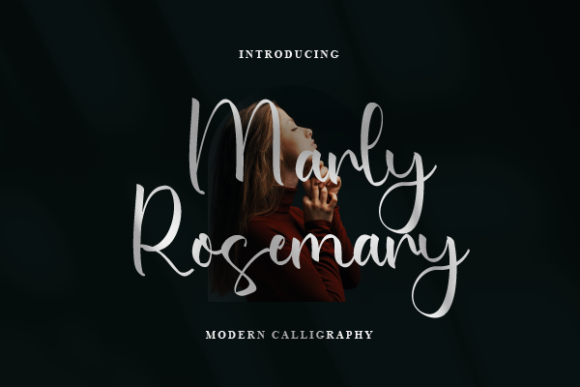
I recently worked on a branding project for a small boutique client who wanted a website that felt soft, feminine, and modern. I had been collecting script fonts for web use and decided to test Marly Rosemary in the hero section of their homepage. Right away, the font caught my eye with its graceful curves and airy balance. It’s a delicate script font that doesn’t feel overly ornate, making it surprisingly versatile for digital design.
As a web designer, I’m always cautious with decorative fonts because they can easily become unreadable or distract from the message. But with Marly Rosemary, I found a sweet spot—especially for short phrases and brand statements. I used it for the main headline over a soft pastel hero image and paired it with a clean sans serif for the supporting text. The contrast worked beautifully, giving the page a curated, high-end feel without sacrificing usability.
Testing Marly Rosemary Across Devices and Layouts
One of the first things I check when using a new font is how it renders across devices. I tested Marly Rosemary on mobile, tablet, and desktop, and was pleased with how well it held up. On larger screens, the font’s subtle details—like the soft swashes and elegant ligatures—really shine. On mobile, it still looked crisp and readable as long as I kept the font size above 24px.
I also tested it in a few different contexts: as a logo alternative, in a call-to-action button, and as a section heading in the product gallery. It worked best in the hero section and as a decorative accent in the gallery, where it added a touch of personality without overwhelming the layout. However, I wouldn’t recommend it for small navigation labels or form fields—those places need something more structured and legible at smaller sizes.
Pairing Marly Rosemary with Web-Safe Fonts
Font pairing is crucial in web design, especially when using a decorative script like Marly Rosemary. I found that pairing it with a minimalist sans serif like Open Sans or Lato created a balanced visual rhythm. For a slightly more editorial feel, I also tried it with a simple serif font like Merriweather, which worked well for blog headers and article intros.
What I love about Marly Rosemary is that it’s not too bold or flashy—it’s understated but still expressive. This makes it ideal for brands that want to feel elegant without looking overly formal. I’d definitely recommend it for creative portfolios, wellness websites, boutique shops, and personal brands that lean into soft, emotional storytelling.
Performance and Accessibility Considerations
From a technical standpoint, Marly Rosemary comes in standard webfont formats (WOFF, TTF), which makes it easy to integrate into modern websites. I loaded it via a self-hosted font setup to keep load times minimal and avoid third-party dependencies. The file size was reasonable, and I didn’t notice any layout shifts or performance issues once it was implemented.
Accessibility is always a concern with decorative fonts. I made sure to only use Marly Rosemary for large, short-form text where readability wasn’t compromised. I also checked contrast ratios when placing it over images and used subtle text shadows to ensure legibility on light backgrounds. For users who rely on screen readers or need high-contrast settings, the font itself isn’t an issue since it’s used decoratively rather than for body content.
When to Use (and When to Avoid) Marly Rosemary
If you're designing a landing page, portfolio site, or online store that needs a touch of elegance, Marly Rosemary is a great choice. It works especially well in:
- Hero section headlines
- Brand taglines or mission statements
- Call-to-action buttons with short text
- Section headers in editorial layouts
- Logo alternatives or signature-style accents
However, it’s not ideal for:
- Body copy or long paragraphs
- Small UI elements like form labels or dropdown menus
- Technical dashboards or data-heavy interfaces
- Low-contrast or complex background overlays
Always test the font in your specific layout and make sure it supports your content’s purpose. If you're unsure, start with a larger font size and keep the surrounding design clean to let Marly Rosemary shine.
Final Thoughts: A Thoughtful Addition to Any Web Designer’s Toolkit
Marly Rosemary is a charming script font that brings a sense of warmth and sophistication to the web. It’s perfect for designers who want to add a personal, handcrafted touch to their digital projects without sacrificing usability. Whether you're building a creative portfolio, a boutique online store, or a personal brand website, this font is worth exploring—especially since it’s available as a freebie.
Before using it in production, be sure to check the licensing terms. Most free script fonts are fine for personal use, but commercial projects may require a premium license. Also, don’t forget to test alternate characters and ligatures if they’re included—those small details can elevate your design even further.
All in all, Marly Rosemary is a delightful typeface that reminds us that web design doesn’t have to be stark or overly minimal. With thoughtful use, it can help create websites that feel both modern and human.